ZET Accounting
Publisher Description



Accounting-based business bookkeeping app
ZET Accounting has a feature for recording all types of business transactions, from sales, purchases, Initial Capital, Cash flow, accounts payable and receivable, to operating expenses, all are available
In-App Features:
- Cash flow details
- Inventory details
- Count stock automatically
- Debt and accounts receivable details
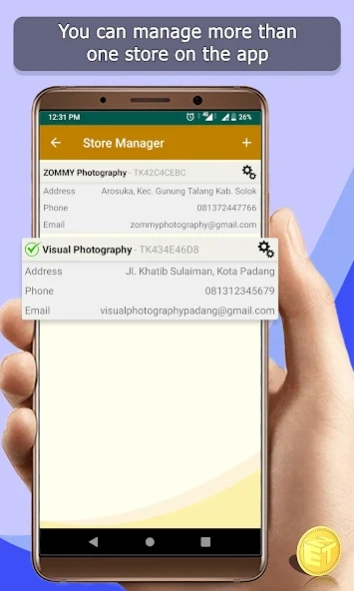
- Manage more than one store
- Automatically calculate the depreciation of Fixed Assets
- Manage operating expenses
- Export and import data in the form of * .csv files
- Export reports in PDF form
- Print bills using a bluetooth printer
In-App Reports :
- Income statement
- Statement of changes in capital
- Inventory report
- Financial statements
- Trial balance
Input menu inside application:
- Income
1. Revenue
2. Sales
- Purchases
1. Products Purchases
2. Supplies Purchases
3. Fixed Assets Purchases
- Initial Capital
1. Cash
2. Fixed Assets
3. Products
4. Supplies
5. Accounts Receivable (Past Period Bookkeeping)
5. Debt (Past Period Bookkeeping)
- Withdrawal
1. Cash Withdrawal
2. Products Withdrawal
- Operating Expenses
1. Cash Expenses
2. Product Expense
3. Supplies Expense
4. Fixed Asset Expenses
- Cash Flow
1. Cash Receivables
2. Receive accounts receivable
3. Cash Payable
4. Debt Payment
5. Cash Transfer
About ZET Accounting
The company that develops ZET Accounting is ZET App. The latest version released by its developer is 1.0 .
To install ZET Accounting on your Android device, just click the green Continue To App button above to start the installation process. The app is listed on our website since 2025-04-25 and was downloaded 9 times. We have already checked if the download link is safe, however for your own protection we recommend that you scan the downloaded app with your antivirus. Your antivirus may detect the ZET Accounting as malware as malware if the download link to com.zetapp.zetaccounting is broken.
How to install ZET Accounting on your Android device:
- Click on the Continue To App button on our website. This will redirect you to Google Play.
- Once the ZET Accounting is shown in the Google Play listing of your Android device, you can start its download and installation. Tap on the Install button located below the search bar and to the right of the app icon.
- A pop-up window with the permissions required by ZET Accounting will be shown. Click on Accept to continue the process.
- ZET Accounting will be downloaded onto your device, displaying a progress. Once the download completes, the installation will start and you'll get a notification after the installation is finished.
Program Details
System requirements
Download information
Pricing
Version History
version 2.4.4
posted on 2025-04-25
1. Export database automatically when application is closed
2. display monthly chart
3. showing details of the income statement
4. Available Debt and Accounts Receivable Flow menu
version 2.3.2
posted on 2021-08-05
1. Export database automatically when application is closed
2. display monthly chart
3. showing details of the income statement
version 2.2.9
posted on 2021-06-04
1. New logo for app
2. Added edit feature for multiple transactions
3. Added combined reports from multiple stores at once
4. Fixed some Bugs in calculating fractions
version 2.2.7
posted on 2021-05-10
1. Combined
Payment method
and
Initial cash
to
cash
table
2. Added new sales and purchase returns menu
3. Added a new Cash Flow Statement menu
4. Fixed some Bugs in calculating fractions
version 2.1.3
posted on 2021-01-13
- Can stop automatic depreciation of fixed assets until a specified date
- Starting a new bookkeeping based on ending inventory on the old books without deleting the old books
version 2.0.0
posted on 2020-11-22
added features to the application:
1. Manage more than 1 store on the app
2. Set the transaction date manually or automatically
3. Export PDF for income statement
4. Send invoice in PDF format
5. Automatically export data when the application starts (Can be disabled)
Improvements from previous versions:
1. Fixed an error when displaying the table
2. Fixed errors when inputting Multiple Transactions
version 1.30.12
posted on 2020-11-02
Please export your data before updating the application, because there is an update to the database
added features to the application:
1. Manage more than 1 store on the app
2. Set the transaction date manually or automatically
3. Export PDF for income statement
4. Automatically export data when the application starts (Can be disabled)
Improvements from previous versions:
1. Fixed an error when displaying the table
2. Fixed errors when inputting Multiple Transactions
version 1.29
posted on 2020-08-16
- simpler display
- You can contact the developer through the application
- Bug Fixed for android 4.4 and android 10
